The miscellaneous tool tab has a few additional features for photos.
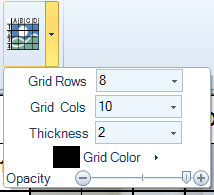
The Draw Grid Button will overlay a reference grid pattern over the photo. To select rows, columns, color, opacity and thickness click the dropdown arrow to the right of the button:
These settings need to be set before clicking the button to add the grid.
Copy To Clipboard
Clicking this clipboard button will put the photo with all drawings onto the clipboard. Drawings become part of the image. This is useful to paste images with drawings in apps outside FastPhotoReports
Revert Button
Click the revert button to undo the grid overlay. Once a different image is displayed in the photo editor the changes will be permanent


 Copy To Clipboard
 Revert Button