The Simple Text Editor is used for Photo Comments and for Paragraph Text subsections. Paragraph Text subsections are best for small blocks of text (less than one page). Paragraph Text sections can be displayed one after another on the same page by unchecking the 'Start on New Page' checkbox on the Subsection Options Tab. The Simple Text Editor is designed for very basic editing. There is support for shortcut keys such as:
cntrl + c Copy
cntrl + v Paste
cntrl + b Toggle Bold / Unbold
cntrl + z Undo
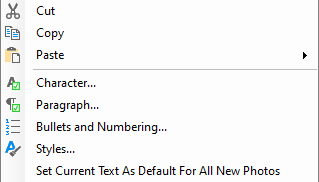
You can also select text and right mouse click to display a text context menu where additional text formatting can be set:
There are buttons at the top left of the text editor to zoom the text in or out and to refresh the Report View to reflect latest text changes
There are also tool tabs at the top of the text editor with functions described in next sections.